Building a shared SMS inbox for Auth0 demo environments
Running a demo that includes SMS multi-factor authentication creates a friction point that is easy to underestimate: every person who wants to present the flow needs a phone with their own number enrolled against the relevant Auth0 user. That is fine for one person. It is a meaningful barrier when you want a whole team to be able to run the same demo interchangeably.
In this post I will walk through how Auth0's custom-phone-provider trigger solves this by routing SMS codes to a shared inbox instead of a carrier, and how to build the inbox itself.
The problem with standard SMS in demo environments
Standard SMS MFA works like this: Auth0 calls a provider (Twilio, for example), the provider delivers to the enrolled phone number, the person receives the code on their device.
The diagram below shows how that compares to the custom-phone-provider approach.
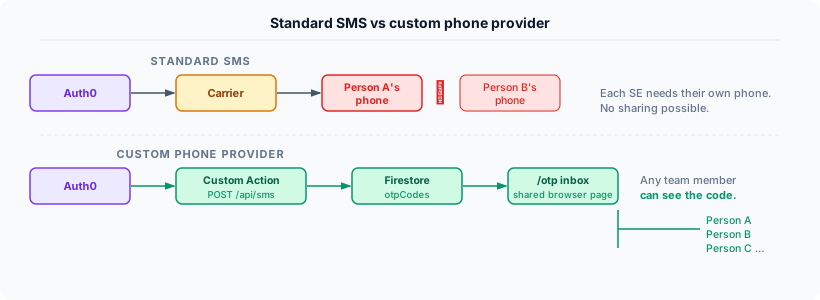
The standard path is fine for production. In a demo context, it means:
- Each demo user needs a real phone number enrolled against their Auth0 account
- That phone number has to belong to someone who is physically present when the demo runs
- If a colleague wants to run the same demo, they need to re-enrol with their own number
The custom-phone-provider approach replaces SMS delivery entirely. Instead of calling a carrier, Auth0 calls your Action, which can do whatever you like with the code - including writing it to a database that anyone on the team can read.
The custom-phone-provider trigger
Auth0 Actions has a trigger specifically for this: custom-phone-provider. When an Action is bound to this trigger, it becomes the phone delivery mechanism for the tenant. The carrier is bypassed entirely.
The trigger fires with an event.notification object that includes everything you need.
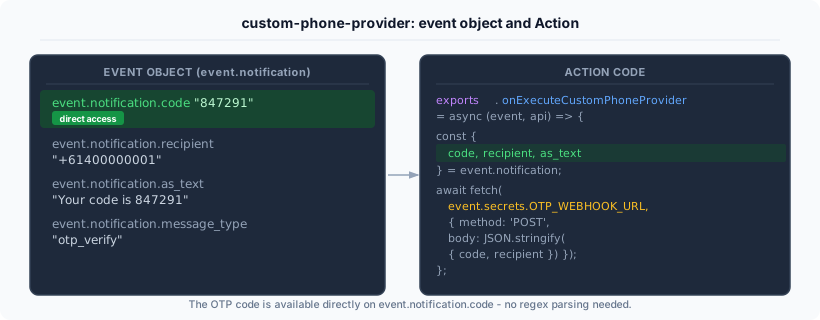
The key field is event.notification.code - the OTP value is available directly, without parsing it out of a message string. The Action I used looks like this:
exports.onExecuteCustomPhoneProvider = async (event, api) => {
  const { code, recipient } = event.notification;
  const messageText = event.notification.as_text ?? '';
  await fetch(event.secrets.OTP_WEBHOOK_URL, {
    method: 'POST',
    headers: {
      'content-type': 'application/json',
      'authorization': `Bearer ${event.secrets.OTP_WEBHOOK_SECRET}`,
    },
    body: JSON.stringify({ recipient, messageText, code }),
  });
};
Two Action secrets carry the endpoint URL and a shared bearer token. The token is the only thing keeping random internet traffic out of the inbox - simple but sufficient for a demo context.
One thing to watch: this trigger is custom-phone-provider, not send-phone-message. There is another trigger with a similar name, and the event objects are different. The send-phone-message trigger uses event.message_options, which does not exist on custom-phone-provider. If you bind to the wrong one the Action will fail silently and the code will never arrive.
The webhook endpoint
The endpoint itself is minimal. It verifies the bearer token, extracts the payload, and writes to a Firestore collection:
export async function POST(req: Request) {
  const auth = req.headers.get('authorization') ?? '';
  if (auth !== `Bearer ${process.env.OTP_WEBHOOK_SECRET}`) {
    return new Response('Unauthorized', { status: 401 });
  }
  const { recipient, messageText, code } = await req.json();
  await db.collection('otpCodes').add({
    recipient, messageText, code,
    receivedAt: new Date().toISOString(),
  });
  return new Response('ok', { status: 200 });
}
I am using Next.js route handlers here, but the same pattern works in any framework. The only requirement is a publicly accessible HTTPS endpoint - the Action calls it from Auth0's infrastructure, so localhost will not work.
The inbox page
The /otp page reads from Firestore and displays the last ten minutes of codes. It refreshes automatically every five seconds via a client-side timer:
// Server Component - reads Firestore directly
const cutoff = new Date(Date.now() - 10 * 60 * 1000).toISOString();
const snap = await db.collection('otpCodes')
  .where('receivedAt', '>=', cutoff)
  .orderBy('receivedAt', 'desc')
  .limit(20)
  .get();
The countdown in the header tells the presenter how long until the next refresh so they know whether to wait or trigger a new code.
For demo environments where multiple users share a single set of canonical phone numbers, the inbox shows a label next to each code identifying the user it belongs to - for example, +61400000001 maps to owner@atko.email. This makes it clear which code to use when two users are involved in the same flow.
Pre-enrolling phone numbers
For a shared demo setup, you can pre-enrol each demo user with a specific fake phone number using Auth0's Management API, so presenters do not have to go through the enrolment flow on first use:
await fetch(`https://${domain}/api/v2/users/${userId}/authentication-methods`, {
  method: 'POST',
  headers: { authorization: `Bearer ${token}`, 'content-type': 'application/json' },
  body: JSON.stringify({
    type: 'phone',
    phone_number: '+61400000001',
    preferred_authentication_method: 'sms',
  }),
});
The numbers do not need to be real - +61400000001 through +61400000009 work fine as demo numbers. Auth0 validates E.164 format but not carrier existence at the enrollment step; validation is handled by the provider at delivery time, which in this case is your custom Action rather than a carrier.
One note: the phone_number field on the user profile is distinct from the Guardian enrollment. Setting phone_number on the user object does not enrol them in Guardian SMS. The authentication-methods endpoint is what creates the actual MFA enrollment.
What this enables
Once this is in place, running an SMS MFA demo requires nothing more than opening the /otp page in a browser tab before starting. When the MFA challenge fires, the code appears in the shared inbox within a second or two. Any team member can see it. The demo can be handed between presenters mid-session without any re-enrollment.
For a demo platform where the same credentials are shared across a team - which is the pattern I described in the delegated access series - this removes the last per-person setup requirement. The demo runs identically regardless of whose laptop it is on.
A few caveats worth naming
This is not for production. Routing OTP codes to a shared database is a deliberate weakening of the security model. In production you want codes to be delivered to a specific, verified device. The custom-phone-provider trigger exists for legitimate production use cases - building on-premises delivery, integrating with enterprise messaging systems, supporting regions where Auth0's built-in providers do not operate - but a shared demo inbox is not one of them.
The Action replaces the provider entirely. Once custom-phone-provider is bound, your Action is responsible for all phone message delivery on the tenant. If your Action has a bug or the webhook is down, MFA codes will not be delivered to anyone. In a demo tenant this is low-stakes; in a production tenant it is a single point of failure worth thinking carefully about.
The inbox is append-only by design. Codes accumulate until they age out of the ten-minute window. There is no delete or mark-as-used operation. For a demo context this is fine - the presenter copies the code and moves on. A production implementation would want more careful lifecycle management.