@auth0/auth0-hono on Deno Deploy: A Logout That Doesn't Log You Out
I've already written about deploying @auth0/auth0-hono to Cloudflare Workers as a second runtime alongside the Node.js demos in my Auth0 session and token demo suite. Deno Deploy was the obvious third: same SDK, same OIDC flow, a genuinely different dependency-resolution model underneath it (npm: specifiers resolved straight from the registry, no node_modules, no bundler). I wanted the same "same flow, different infrastructure" comparison a third time.
The deploy itself went fine once I sorted out that the Deno Deploy CLI wants your organisation's slug, not its display name - my org shows as "Tobytes" in the console UI, but deno deploy create --org only accepts the lowercase slug (tobyallen), visible only via deno deploy whoami. Nothing in the console UI tells you that; you find out from a flat "organization not found" error. Once that was sorted the app deployed, logged in correctly, and showed decoded claims on a profile page exactly as intended.
Logging out did not work the way I expected. In this post I will detail what actually happens when you call @auth0/auth0-hono's /auth/logout route by default, why it doesn't do what its name suggests, and how I found the exact same gap sitting unfixed in a demo I'd already shipped weeks earlier.
What /auth/logout actually does by default
Clicking "log out" cleared my local session cookie, as expected. What I didn't expect: clicking "log in" again immediately re-authenticated me with no login form at all. Auth0's own session at the identity provider was still very much alive.
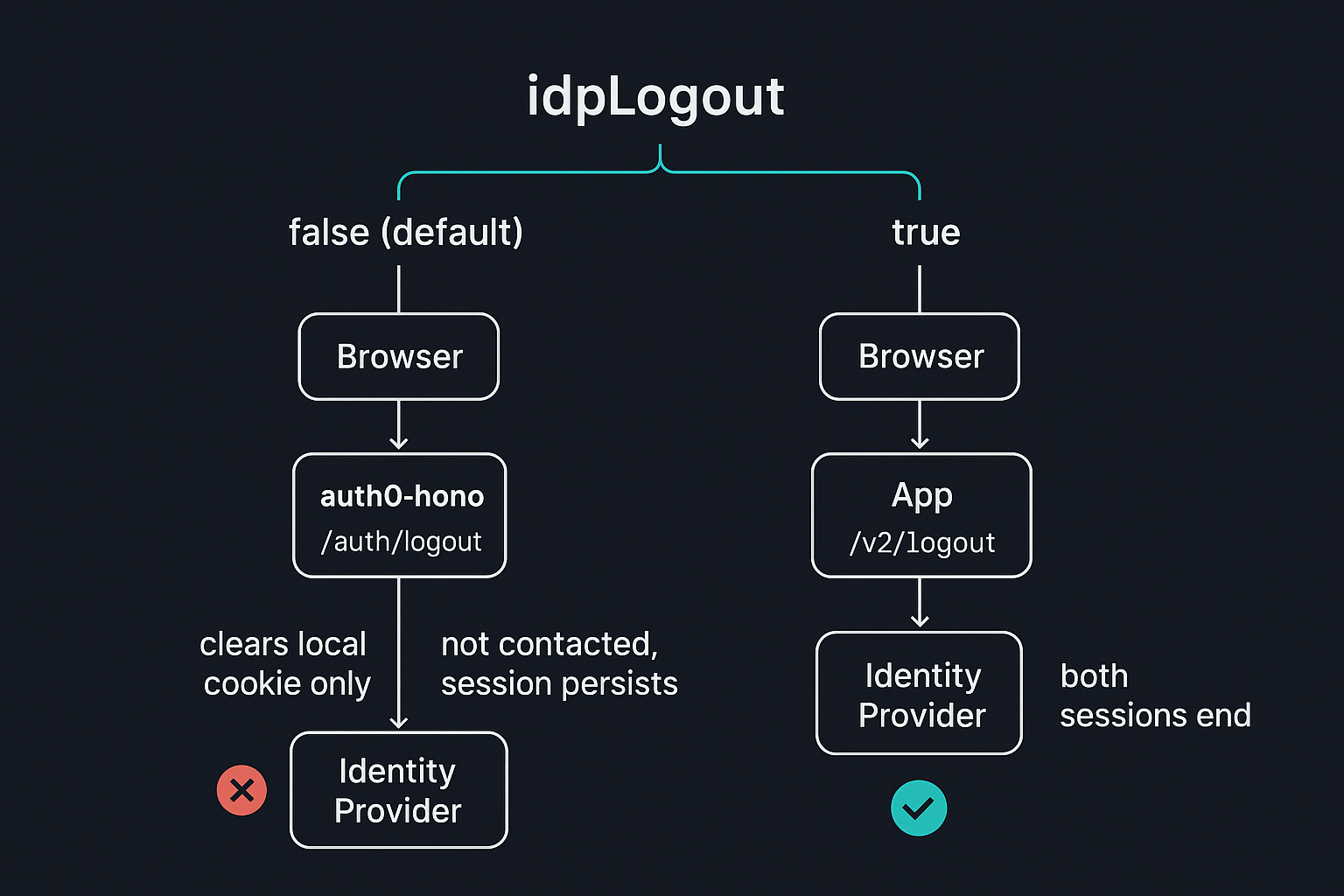
Reading @auth0/auth0-hono's logout middleware source rather than assuming the README covered it explained why:
if (!configuration.idpLogout) {
  return c.redirect(returnTo);
}

return c.redirect(logoutUrl);
idpLogout gates whether the SDK ever redirects to Auth0's own /v2/logout endpoint at all. If it's falsy, the handler clears the local session cache and cookie and sends you straight back into the app - Auth0 is never told anything happened. Checking the SDK's own config schema confirmed the default:
idpLogout: z.boolean().optional().default(false)Unless a consuming app explicitly passes idpLogout: true, logging out of the app never logs you out of Auth0. The fix is one line, the same shape as the authRequired fix from the Workers post:
app.use('*', auth({ authRequired: false, idpLogout: true }))It was already in a demo I'd shipped weeks earlier
Before writing this up I checked the Cloudflare Workers demo from the earlier post, since it uses the exact same middleware call. Same gap, unfixed:
app.use('*', auth({ authRequired: false }))No idpLogout set there either. That demo has been live for weeks, and I hadn't clicked "log out" and then tried logging back in on a fresh test to check whether the identity provider session actually ended - I'd checked that the redirect worked and that the cookie cleared, which is exactly the kind of verification that looks complete and isn't. I've since fixed both.
A user who clicks "log out" and sees themselves land back on a logged-out-looking page has every reason to believe they are logged out. If your Auth0 tenant is shared across multiple applications - which is the entire point of an identity provider - that surviving session means any other application sharing the tenant can silently re-authenticate them without a login prompt. The failure is invisible from the app's own UI; you would only catch it by deliberately trying to log back in straight after logging out, in a real browser, which is precisely the step that's easy to skip once the redirect itself looks right.
Conclusion
idpLogout: true costs nothing and should be the default in most integrations. A logout that doesn't log you out of the identity provider isn't a trade-off, it's a bug. If you're running @auth0/auth0-hono anywhere, on Workers, on Deno Deploy, or otherwise, check whether you've set it explicitly rather than assuming the option name describes the default behaviour.