Native-to-Web SSO with Auth0: How the Session Transfer Token Works
When a user taps "Open in browser" inside your mobile app, they get asked to log in again. This is not a bug - it is the correct behaviour of two independent OAuth clients with no shared session context. Auth0's Native-to-Web SSO adds a dedicated exchange to solve this without compromising the security properties of either session.
The mechanism is a session_transfer_token: the native app exchanges its refresh token for a short-lived, single-use, IP-bound token. The web app passes that token to Auth0's /authorize endpoint as a query parameter, Auth0 validates it server-side and a fully independent web session is established, with no Universal Login prompt and no credential re-entry.
In this post I will detail how the session_transfer_token exchange works, what security properties it carries, and how I added a live click-through demo to the Auth0 session and token demo suite that makes the mechanics visible.
The areas we cover are as follows.
- The problem: why mobile-to-web always re-prompts
- The session transfer token flow
- Security properties of the STT
- Building the demo
- What the token diff reveals
The Problem: Why Mobile-to-Web Always Re-Prompts
A mobile app and a web browser are separate OAuth clients. The mobile app authenticates through a PKCE flow and holds its own session - typically an access token, ID token, and refresh token in the app's secure storage. The browser has no awareness of that session; it only knows about its own cookies. When the user taps a link that opens in a browser, Auth0 checks for a browser-side session cookie, finds none, and presents the login prompt.
The obvious workaround - passing tokens from the native app to the browser via a URL parameter - is not viable. Tokens in URLs end up in server logs, browser history, and referrer headers. RFC 6749 Section 10.3 flags this risk explicitly for bearer tokens and it applies equally here.
The session_transfer_token is designed specifically for this handoff. It is not a bearer token in the normal sense, it proves nothing on its own, and it is consumed on first use.
The Session Transfer Token Flow
The exchange is four steps.
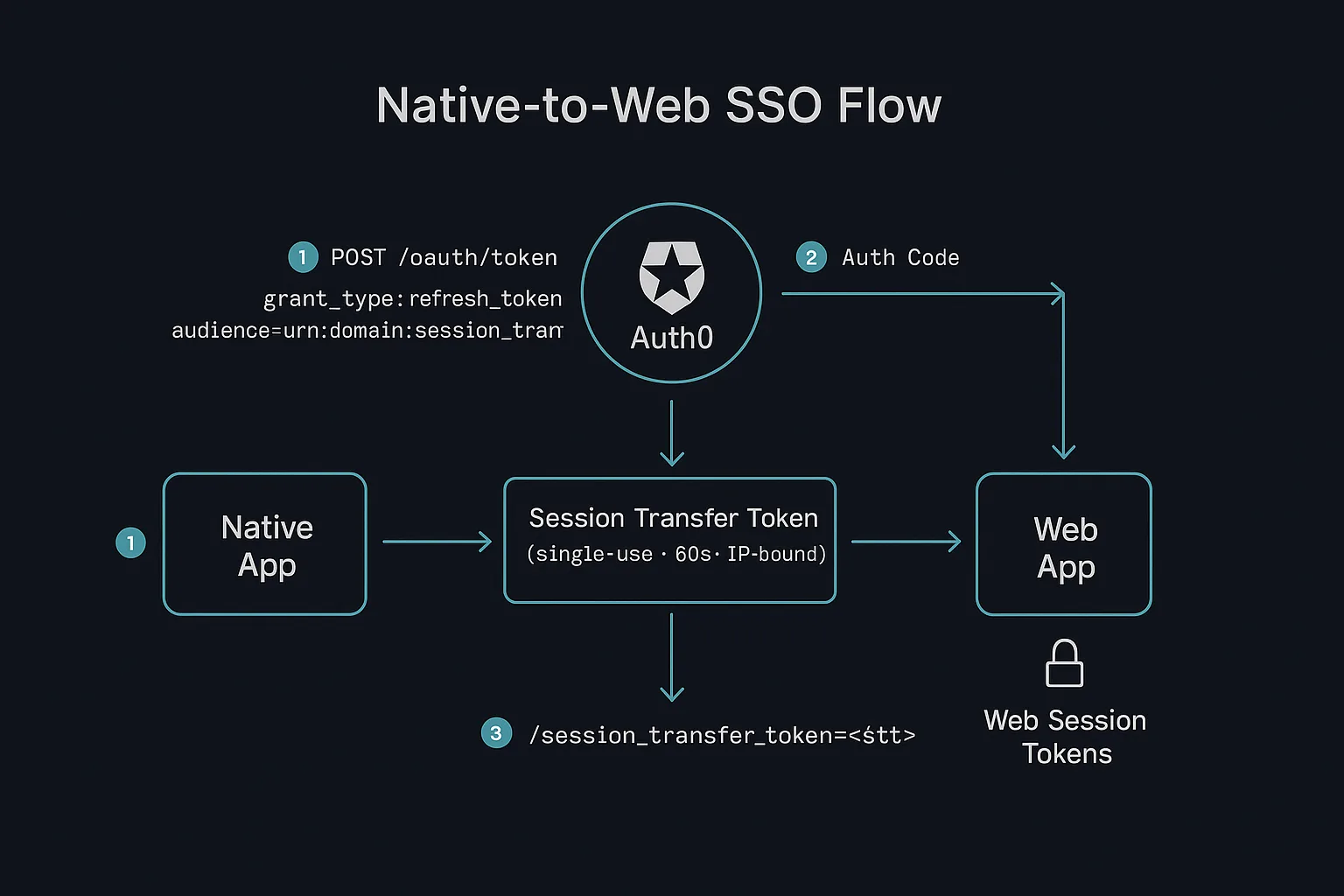
Step 1 - Exchange the refresh token for an STT. The native app calls Auth0's token endpoint with grant_type=refresh_token and a special audience value that signals the STT grant:
POST /oauth/token
grant_type=refresh_token
client_id=<native_client_id>
refresh_token=<native_rt>
audience=urn:<your_domain>:session_transfer
Auth0 returns an access_token field in the response body - this is the session transfer token. Despite the field name, it is not a bearer token intended to authorise resource server requests; it is a one-time-use credential for the handoff and carries expires_in: 60.
Step 2 - Open the browser with the STT. The native app opens the device browser pointing at Auth0's /authorize endpoint with the STT as a query parameter:
GET /authorize
?session_transfer_token=<stt>
&client_id=<web_client_id>
&redirect_uri=<callback>
&response_type=code
&scope=openid+profile+email
Step 3 - Auth0 validates and issues an auth code. Auth0 checks the STT against its token store, validates the IP binding, marks it as consumed, and redirects to the callback with a standard authorisation code.
Step 4 - Web app exchanges the code for tokens. The web app completes a normal authorisation code exchange at /oauth/token and receives its own access token, ID token, and optionally a refresh token. The user is now authenticated in the browser without having seen a login screen.
Security Properties of the STT
The STT is engineered to be safe to put in a URL, which a regular access token is not:
- Single-use. Auth0 marks the STT as consumed on the first
/authorizecall. A second call with the same token returns an error. - 60-second expiry. The entire usable window is one minute from issuance. A leaked STT is useless after that window closes.
- IP-bound. Auth0 validates that the
/authorizecall originates from the same IP as the/oauth/tokencall that generated the STT. This binding is configurable on the web client viaenforce_device_binding: "ip","asn", or"none". - Cascade revocation. Setting
enforce_cascade_revocation: trueon the native app's Auth0 client means revoking the native session also invalidates any web session derived from it via STT.
The native app's Auth0 application also needs session_transfer.can_create_session_transfer_token: true configured via the Management API. The web target client correspondingly needs session_transfer.allowed_authentication_methods set to include "query". Neither of these is a self-service dashboard toggle - they require an eligible Auth0 plan and currently need to be enabled by Auth0 support for existing tenants.
Building the Demo
The live demo is at token-session-explainer-demo.vercel.app/demo/native-to-web and is the seventh demo in the broader session and token suite that covers traditional web app sessions, SPA with DPoP, Online Refresh Tokens, BFF with MRRT, SSO isolation, On-Behalf-Of, and Custom Token Exchange.
Since the demo runs server-side in Next.js rather than on an actual mobile device, both the "native app" and the "web app" are simulated using separate @auth0/nextjs-auth0 client instances with different client IDs, distinct session cookie names (native_session and web_target_session), and separate /auth/native/* and /auth/web-target/* route namespaces in the proxy middleware. From the Auth0 side, this is indistinguishable from a real mobile app handing off to a browser.
The STT exchange itself happens in a server-side API route, which reads the refresh token from the native session and calls Auth0's token endpoint directly:
const res = await fetch(`https://${DOMAIN}/oauth/token`, {
  method: 'POST',
  body: new URLSearchParams({
    grant_type: 'refresh_token',
    client_id: NATIVE_CLIENT_ID,
    client_secret: NATIVE_CLIENT_SECRET,
    refresh_token: refreshToken,
    audience: `urn:${DOMAIN}:session_transfer`,
  }),
});
const { access_token, expires_in } = await res.json();
// access_token is the STT; expires_in is 60
The demo surface displays the actual STT value, the exact request payload sent to Auth0, a 60-second countdown timer, and the /authorize shape with the STT injected. One implementation detail worth noting: rather than constructing the /authorize URL directly in the browser, the "Authorise Web App" button redirects to the web client's SDK login route with the STT as a query parameter (/auth/web-target/login?session_transfer_token=<stt>). The @auth0/nextjs-auth0 login handler forwards all query parameters as authorisation parameters to /authorize, which means the SDK generates state, code_challenge, and nonce before the redirect. Constructing the /authorize URL manually and navigating to it directly causes a state mismatch error on the callback - the SDK never stored the state it would need to verify.
What the Token Diff Reveals
Once both sessions are established, the demo shows a claim-by-claim comparison between the native app's tokens and the web app's tokens. Claims that differ are highlighted; claims that are identical are shown in grey.
The comparison makes concrete what the flow actually guarantees and what it does not:
subis identical - the STT transfers the user identity, not a reference to it.aud,azp, andclient_iddiffer - these are independent OAuth grants issued to different clients. The native app's access token is scoped to the native audience; the web app's is scoped to whatever audience the web client is configured to request.iatdiffers by a few seconds - two separate token issuances at different times.- The native session holds a refresh token; the web session does not. The web client in this demo is configured with
allow_refresh_token: false, making the web session a forward-only transfer. If you want the web session to persist beyond the initial access token lifetime, settingallow_refresh_token: trueon the web target client will get you there - but then you have two long-lived grants in play, andenforce_cascade_revocationbecomes more important to have configured on the native client.
Conclusion
Native-to-Web SSO fills a genuine gap in the Auth0 session model. Mobile apps have always been able to establish strong authenticated sessions, but handing those sessions off to the browser without forcing re-authentication required workarounds of varying quality. The session_transfer_token is a clean solution with sensible security defaults. The live demo at token-session-explainer-demo.vercel.app/demo/native-to-web makes the exchange mechanics visible if you want to step through the flow with real tokens. The Auth0 documentation covers the full configuration options including SAML and WS-Fed variants if your web app uses those protocols rather than OIDC.