Building a Live Auth0 Token and Session Demo
The previous post in this series covered every Auth0 session and token option in theory. This one is about what I actually built to prove they work together - a deployed demo application that puts each pattern side by side so the tradeoffs are visible rather than hypothetical.
The demo lives at token-session-explainer-demo.vercel.app. In this post I will walk through what each part of the demo demonstrates and pick out three engineering problems that were more interesting than expected.
The areas we cover are as follows.
- The eight demo patterns and what each one proves
- Correlating sessions across three auth clients into a unified view
- Making Multi-Resource Refresh Token rotation visible
- Proxying Fingerprint.com through first-party routes to bypass ad blockers
- On-Behalf-Of and Custom Token Exchange in practice
The Eight Demo Patterns
The demo exposes eight distinct integration patterns, each on its own page. The architecture overview below shows how they sit together.
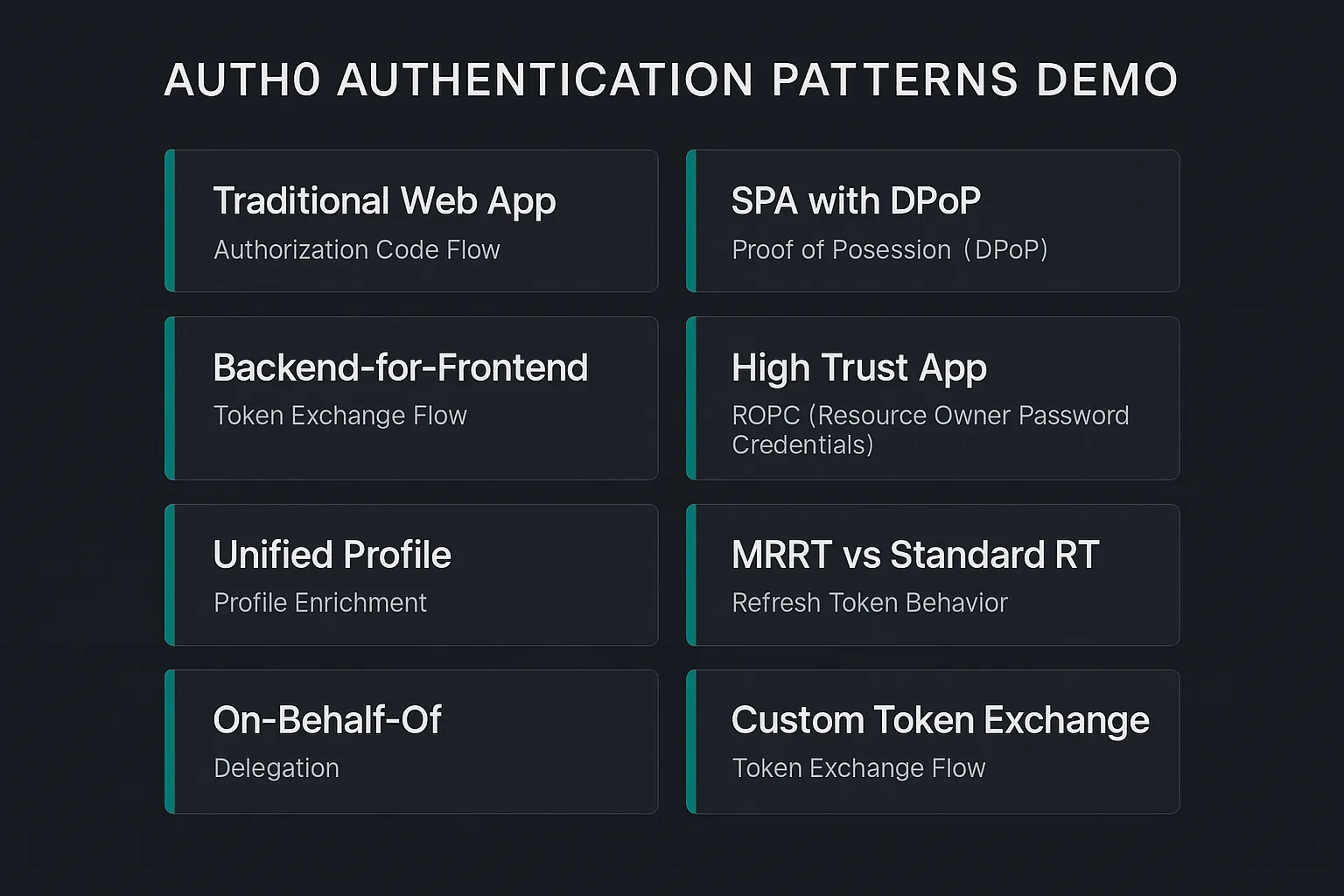
Traditional Web App (/demo/traditional) implements the standard Authorization Code Flow with a server-side session backed by Firestore. All tokens stay on the server - the browser holds only an encrypted session cookie. Back-Channel Logout is wired up, so when you revoke a session via the Session Management API it sends a signed Logout Token directly to the app's /auth/backchannel-logout endpoint, and the server-side session is destroyed without any browser interaction. The demo lets you sign in from two browsers, revoke one from the other, and watch the first browser get kicked out on its next request - no redirect required in browser A.
SPA with DPoP (/demo/spa) runs @auth0/auth0-spa-js with useDpop: true and tokens held only in memory - nothing in localStorage or sessionStorage. The SPA has no server-side session at all. A Post-Login Action stamps Refresh Token Metadata on the refresh token at issuance (browser, OS, IP), mirrored onto the ID token as a custom claim so the demo can surface it. The Device List section shows all registered devices for the SPA client specifically, each renameable and individually revocable.
Backend-for-Frontend (/demo/bff) is a confidential OAuth client with tokens stored entirely server-side. The browser receives only an HttpOnly; Secure; SameSite=Lax session cookie - no access token ever appears in a browser response. Two proxy routes (/api/proxy/billing and /api/proxy/inventory) demonstrate Multi-Resource Refresh Tokens: the same underlying refresh token exchanges for access tokens targeting two separate API audiences with no second browser redirect.
High Trust App (/demo/high-trust) demonstrates SSO isolation. The Auth0 client has sso: false set via the Management API, which means the Authorization Server will never reuse an existing SSO session for this application - every login forces fresh credentials regardless of whether the user is already authenticated elsewhere on the tenant.
Unified Profile (/profile) is the page that makes the rest of the demo interesting. It fetches all sessions and refresh tokens for the authenticated user across the entire tenant, correlates them by session_id, and renders a single view showing which applications share an Authorization Server session and which are isolated. Fingerprint.com enrichment augments each device entry with visit history and, on Pro Plus plans, Smart Signals.
MRRT vs Standard RT (/demo/bff) extends the BFF demo with an exchange ledger. Each proxy call shows the refresh token ID before and after exchange, proving the rotation chain is continuous and that both API calls drew from the same token lineage.
On-Behalf-Of (/demo/obo) implements RFC 8693 On-Behalf-Of token exchange. The user logs in via a dedicated app that requests the middle-tier API as audience. A middle-tier service then exchanges that token for a downstream access token scoped to a different API. The resulting token has the same sub as the original user, azp set to the middle-tier client, and an act claim recording the delegation chain.
Custom Token Exchange (/demo/cte) accepts an externally-signed HS256 JWT and exchanges it for a full Auth0 AT + ID token via the Custom Token Exchange feature. An Auth0 Action validates the incoming token's signature, looks up the matching Auth0 user by email, and calls setUserById. No browser redirect, no Universal Login.
Correlating Sessions Across Three Auth Clients
The most interesting engineering problem in the demo is the Unified Profile page. Auth0's Management API exposes sessions and refresh tokens separately - sessions via GET /api/v2/users/{id}/sessions and refresh tokens via GET /api/v2/users/{id}/refresh-tokens. Both endpoints return data for every application on the tenant, which means a single user can have sessions and tokens from the Traditional, BFF, High Trust, OBO Demo, and SPA clients all mixed together.
The key to joining them is the session_id field on each refresh token. When a refresh token is issued, Auth0 records which Authorization Server session it belongs to. Fetching both lists in parallel and grouping refresh tokens by session_id gives you a clean view of which tokens belong to which session, and therefore which applications are sharing an AS session versus which have independent ones.
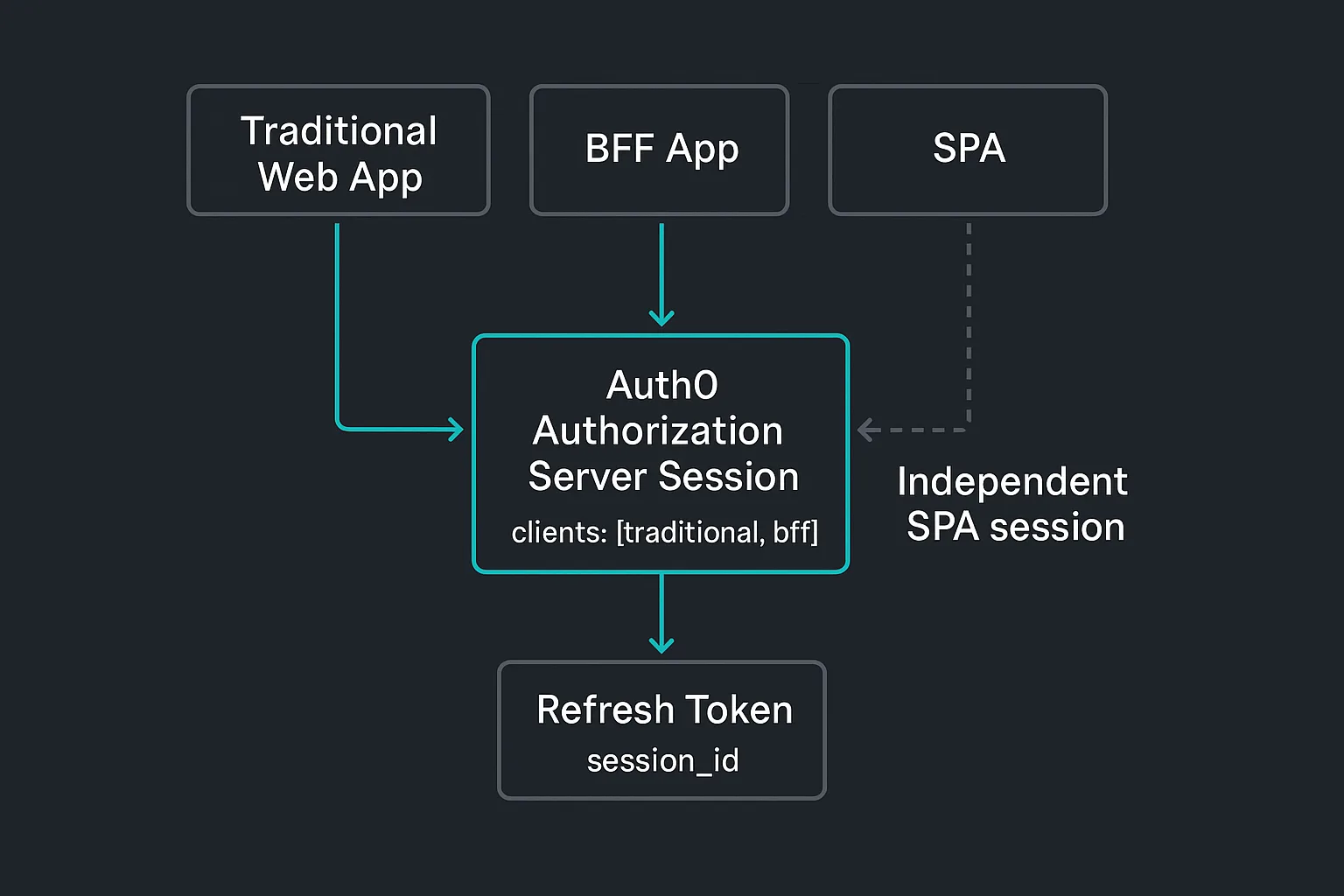
In practice, when a user logs into the Traditional Web App and then opens the BFF demo in the same browser, they will be silently SSO'd through (since the BFF has sso unset, so it accepts the existing AS session). The resulting unified session card shows both Traditional and BFF as app badges on a single entry, along with the clients[] array from the session record confirming both are attached to the same AS session.
The High Trust App, which has sso: false, always produces a separate session card even when the device and IP are identical - the AS session is genuinely independent, not just labelled differently.
The relevant code is in lib/unified-sessions.ts. The join is straightforward but the sort order is worth getting right: sessions are ordered by last_interacted_at descending, with orphaned refresh tokens (no matching session) appended at the end. Orphaned tokens happen when a session has expired or been deleted but the refresh token is still valid - a legitimate state that the profile page surfaces rather than hiding.
Making MRRT Rotation Visible
The BFF demo's MRRT feature is easy to explain in theory but harder to demonstrate convincingly. The claim is that the same refresh token can exchange for access tokens targeting two different API audiences without a second browser redirect. Without some instrumentation, you are just taking that on trust.
The exchange ledger makes it concrete. Each proxy call (/api/proxy/billing and /api/proxy/inventory) fetches the current refresh token ID for this session from the Management API before and after calling auth0Bff.getAccessToken({ audience }). The response includes rtBefore, rtAfter, and the decoded access token's aud claim.
The UI renders a ledger row per call. When the user makes both calls in sequence, row 2 shows rtBefore equal to row 1's rtAfter - the same rotation lineage. A "chain" badge appears when the continuity is confirmed, and the two rows have different aud values in the resulting access tokens. That is the MRRT property made visible: one auth flow, two different APIs, the rotation chain intact throughout.
The MRRT Policy Comparison card at the top of the BFF demo fetches the refresh_token.policies array from the Management API for both the BFF client and the SPA client. The BFF has two policy entries (billing and inventory audiences). The SPA has none - a standard single-audience refresh token. The structural difference is the entire feature.
The "Try unauthorized audience" button deliberately requests an exchange for an audience not in the policy. The route returns whatever Auth0 actually does (error or silent redirect to original audience), so the audience can see the policy enforcement is real rather than theoretical.
Proxying Fingerprint Through First-Party Routes
The Fingerprint.com SDK loads its agent script from fpnpmcdn.net, which appears on essentially every ad blocker's domain list. In production, this means the Fingerprint badge simply does not appear for a large portion of visitors - the browser blocks the CDN request before the SDK can initialise.
The fix is to proxy both the loader script and the API calls through the app's own domain.
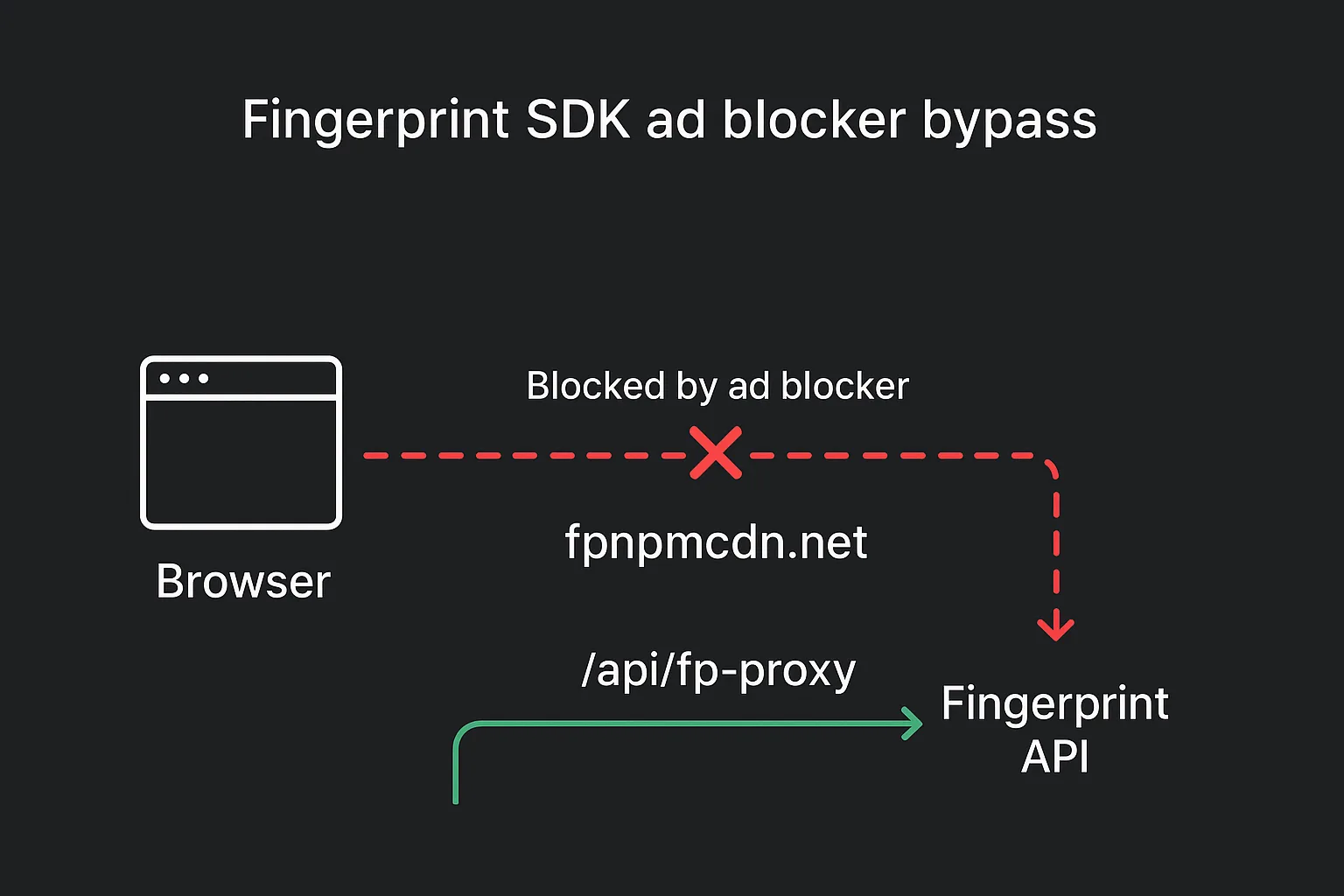
Two routes handle this. GET /api/fp-proxy/v3/[apiKey]/[...path] fetches the agent script from fpnpmcdn.net and forwards it to the browser. POST /api/fp-proxy proxies identification requests to api.fpjs.io. The FpjsProvider is configured with a scriptUrlPattern and endpoint array that points to these routes first and falls back to the direct CDN/API if the proxy errors.
Since the requests now originate from the same domain as the application, ad blockers have no basis to block them. The Fingerprint SDK loads, the visitorId resolves, and the profile page's enrichment works.
The server-side Visits API call (GET /api/profile/fingerprint/[visitorId]) has an IDOR guard: before proxying to api.fpjs.io, the route confirms the requested visitorId appears in at least one refresh token's refresh_token_metadata for the authenticated user. The visitorId is written into refresh_token_metadata via POST /api/profile/fingerprint-link on first profile page load.
On-Behalf-Of and Custom Token Exchange in Practice
Both RFC 8693 flows share the same grant type (urn:ietf:params:oauth:grant-type:token-exchange) but serve different problems.
OBO is for service delegation within Auth0. The user's identity is preserved end-to-end - the downstream Orders API receives a token with the original user's sub, not the middle-tier service's. The act claim records the delegation chain, giving the downstream a cryptographically-bound audit trail of what acted on whose behalf. This is the correct pattern for AI agent architectures where an agent calls APIs on behalf of a user.
The OBO middle-tier client must be created as a resource_server app type in Auth0 with resource_server_identifier set to the middle-tier API's audience - this is documented in the On-Behalf-Of configuration guide. That is a create-time-only field - you cannot set it via a Management API PATCH after the client exists. The demo's Management API setup notes this: if you need to recreate the client, the OBO exchange will fail until the new client is properly typed.
CTE is for identity bridging from outside Auth0. The external token can be any format - the demo uses HS256-signed JWTs, but SAML assertions or arbitrary strings work equally well, provided the Action code can validate them. The Action validates the signature against a shared HMAC secret stored in Action secrets, looks up the matching Auth0 user by email via the Management API (called from inside the Action), and calls setUserById. New users are provisioned on first exchange using create_if_not_exists.
One constraint worth knowing for CTE: creating the CTE Profile that links the Action to a subject_token_type URI requires the create:token_exchange_profiles Management API scope. The demo platform's M2M credentials do not include this scope by default, so the profile must be created via the Auth0 Dashboard (Security - Token Exchange Profiles) rather than programmatically.
Conclusion
The demo is at token-session-explainer-demo.vercel.app. For the full reference on what each session and token option does and when to reach for it, the companion post is Auth0 Session and Token Management: Every Option Explained.
Update (13 July 2026): One user journey missing from the original demo was the anonymous-to-known transition - capturing pre-authentication browsing history and stitching it into the authenticated user profile. That flow is covered in Anonymous to Known: Stitching Pre-Auth Browsing Sessions with PostHog and Auth0.
Update (29 July 2026): The demo has grown considerably since this was published. The Unified Profile page's session view moved into a persistent sidebar that is now mounted on every page in the app, not just /profile - identity, every active session, and revoke actions are visible regardless of which demo you are looking at. /profile itself is trimmed to the display-name editor and the Fingerprint.com Smart Signals detail panel, neither of which fits a narrow sidebar column.
Three new patterns were also added: CIBA against a real Guardian push, including a Rich Authorization Requests toggle, the Device Authorization Grant for input-constrained clients, and a Hono on Cloudflare Workers comparison that runs the same confidential-client pattern on a genuinely different runtime and session-storage model. The homepage now groups all fourteen patterns by mechanism - core client patterns, session transfer and SSO, token exchange, decoupled/non-browser auth, identity bridging, and alternate runtimes - rather than one flat list.