Auth0 Token Vault: Connecting Google Calendar and GitHub on a User's Behalf
Auth0's Token Vault lets your application call a third-party API, such as Google Calendar or GitHub, on a user's behalf, using a token Auth0 manages for you rather than one your application stores itself. This sits neatly alongside the agentic use case that is getting a lot of attention at the moment: an AI agent that needs to read a user's calendar or list their repositories doesn't need its own copy of the user's Google or GitHub credentials, it needs a narrowly-scoped, revocable token that Auth0 mints on demand.
I added this to my Auth0 session and token demo suite as a Google Calendar and GitHub column side by side, so a tester only needs one of the two accounts to see the pattern work end to end. Getting a genuine, non-simulated token out of either provider took five separately-gated prerequisites, three on Auth0's side and two down at the provider itself, and each one produced a different, not obviously related error message. In this post I will detail each of those prerequisites and the specific error that pointed at it, along with a subtlety in how the underlying token exchange works that is worth understanding before you rely on it.
The steps we will cover in this post are as follows.
- What Token Vault actually does under the hood
- Offline access on the primary login
- Activating the My Account API and its client grant
- The federated connection access token grant type
- Why
offline_accessbreaks Google specifically - GitHub wants an App, not an OAuth client
- Logging in with a provider isn't the same as connecting it
What Token Vault Actually Does
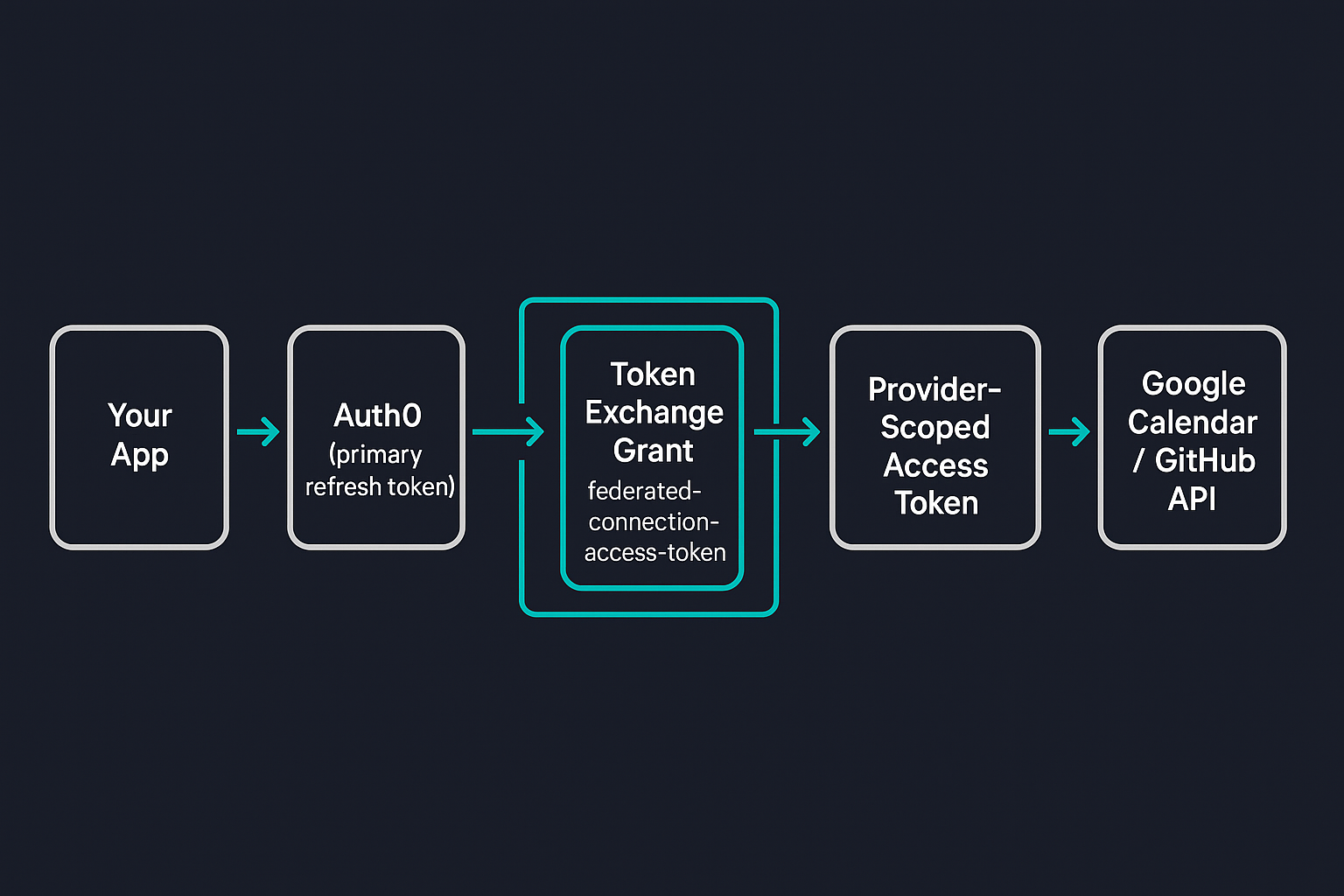
The mechanism is an RFC 8693 token exchange grant, a different, purpose-built one from Auth0's own Custom Token Exchange feature, so it is worth not conflating the two by name. Your application calls getAccessTokenForConnection({ connection: 'google-oauth2' }), and under the hood your Auth0 SDK exchanges the user's own refresh token for a new, provider-scoped access token via grant_type=urn:auth0:params:oauth:grant-type:token-exchange:federated-connection-access-token. Nowhere in that exchange does your application see, store, or forward the user's Google or GitHub password. Auth0 holds the federated refresh token; your application asks for a fresh access token whenever it needs one.
Before any of that works, a user needs to actually link the provider. Auth0 calls this Connected Accounts, and it is a separate consent flow from your primary login, using Auth0's My Account API rather than the regular authorization endpoint, as shown below.
Offline Access on the Primary Login
The first error I hit was the least specific: "Failed to retrieve a connected account access token." Before the Connected Accounts flow can even redirect a user to Google or GitHub, it needs to mint an access token for Auth0's own My Account API, and that requires a refresh token from the user's primary login, not just from whatever provider they are about to connect.
My primary Auth0 client was only requesting openid profile email. Adding offline_access to that scope fixed it:
authorizationParameters: {
  scope: 'openid profile email offline_access',
}
This is easy to miss because it has nothing to do with Google or GitHub specifically. It is a property of the user's session with your own application, and every user needs it if you want the Connected Accounts flow to be available to them at all.
Activating the My Account API and Its Client Grant
Fixing the scope got me further, straight into a second, equally generic error: "An unexpected error occurred while trying to initiate the connect account flow." This one traced back to the SDK's own call to /me/v1/connected-accounts/connect throwing rather than returning a clean error response, which usually means the endpoint returned something that was not JSON.
The My Account API is a tenant-level feature that needs activating on its own, independent of anything else. Once it was active, the connect endpoint needed a client grant for the https://{yourDomain}/me/ audience with create:me:connected_accounts, read:me:connected_accounts, and delete:me:connected_accounts scopes, plus a matching multi-resource refresh token policy so the primary session's refresh token is actually allowed to mint a token for that audience.
The Federated Connection Access Token Grant Type
With the client grant and MRRT policy in place, the Connect flow itself worked, Google and GitHub both redirected correctly and came back with a linked account. Calling getAccessTokenForConnection() straight after, though, produced a third and much more specific error from the tenant logs: "Grant type 'urn:auth0:params:oauth:grant-type:token-exchange:federated-connection-access-token' not allowed for the client."
This one has a direct fix: the application needs that grant type explicitly added to its allowed grant_types, alongside the usual authorization_code and refresh_token. It is not implied by anything else you configure for Connected Accounts, and the tenant log entry (type feta if you are searching for it) is the clearest signal you will get that this is the missing piece.
Why offline_access Breaks Google Specifically
The fourth issue only showed up on Google's own consent screen, not in Auth0 at all: "Error 400: invalid_scope", with Google helpfully listing exactly which scope it rejected. I had included offline_access in the per-request scopes passed to the Connect flow, on the assumption that it worked the same way as it does for a primary Auth0 login.
It does not. offline_access is an Auth0 and OIDC convention, not a scope Google recognises. Google's equivalent, requesting a refresh token, is the access_type=offline authorization parameter, which Auth0 already sends automatically once you enable Offline Access on the connection itself. The fix was to remove offline_access from the scopes array and let the connection-level setting do its job.
GitHub Wants an App, Not an OAuth Client
Auth0's own integration guide for GitHub points you at github.com/settings/apps/new, a GitHub App, rather than the classic OAuth App most Auth0 social connections expect. This matters because scopes work completely differently for GitHub Apps: Auth0 cannot pass requested scopes through to a GitHub App connection at all. The permission boundary is whatever you tick in GitHub's own app-creation form, under Repository permissions and Account permissions, and nothing your application requests at connect time changes that.
For a demo that only lists a user's recent repositories, Metadata: Read-only under Repository permissions was the only permission needed. GitHub's Account permissions section, and the Events and Watching options that sit alongside Metadata, are unrelated to reading a user's own repository list and can stay off.
Logging in With a Provider Isn't the Same as Connecting It
The last thing worth understanding is not an error at all, it is a property of how the exchange works that is easy to assume incorrectly. getAccessTokenForConnection() exchanges the primary session's own refresh token, and it does not care whether the named connection was linked through the explicit Connect flow or is literally how the user logged in. If a user signs into your application using Google as their primary connection, Auth0 already holds a federated refresh token for google-oauth2, and the exchange will succeed immediately, no separate Connect step required.
The catch is scope. That exchange request has no scope parameter of its own, it reflects whatever consent already exists. A primary login that only asked for openid profile email offline_access will get exactly that back, never Calendar access, no matter how many times you call the connection, as shown below.
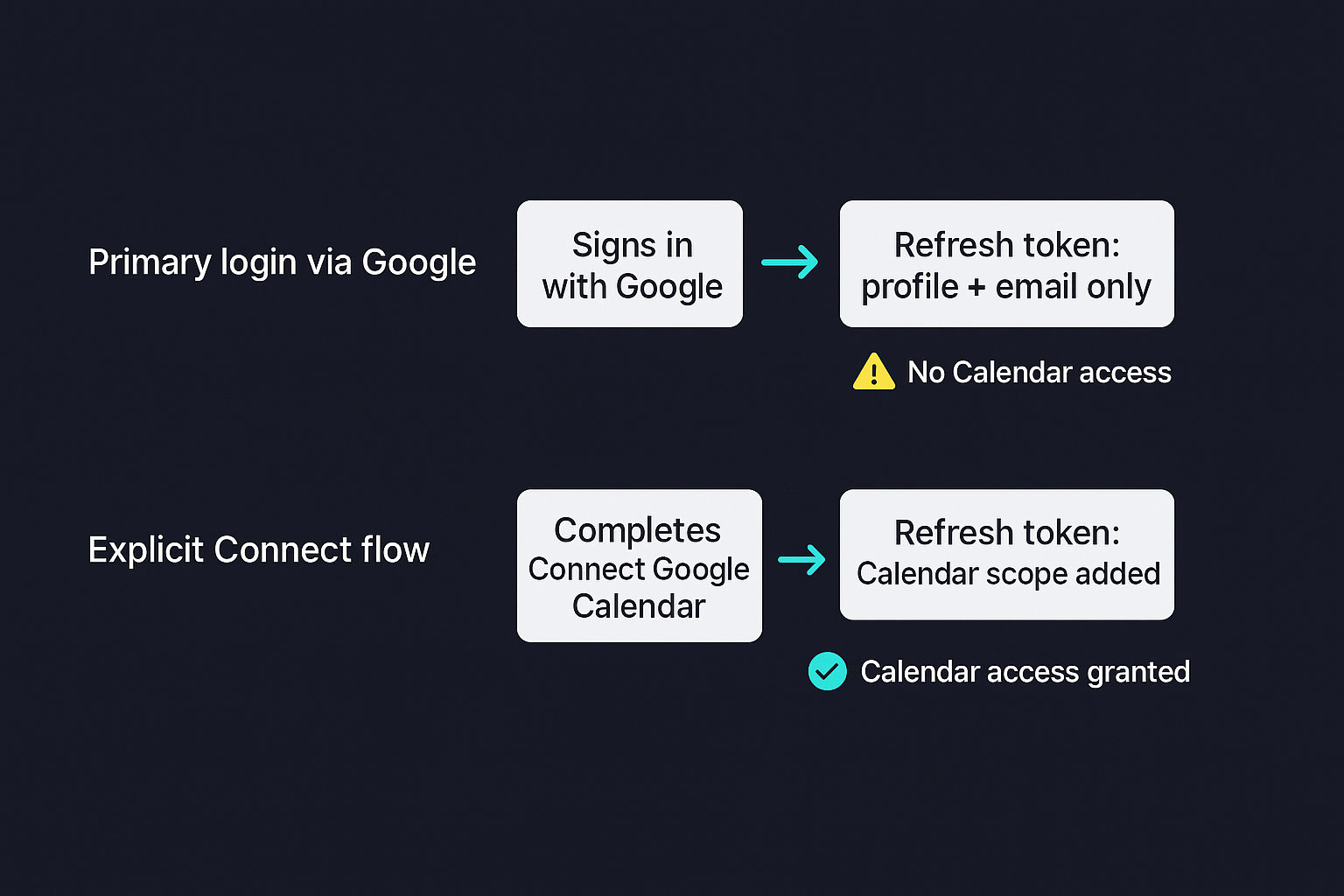
Widening the primary login's scope to cover Calendar for every user just to make this one path zero-click would mean every visitor who picks "Continue with Google" gets an extra consent screen and broader access than most of them need, which is a worse trade than asking the small number of people who actually want Calendar access to complete an explicit Connect step.
Conclusion
Token Vault is a genuinely good pattern once it is wired up correctly, a user's password never touches your application, each connected provider can be revoked independently, and the exchange itself is a standard, auditable grant type rather than something bespoke. Getting there took five prerequisites spread across Auth0's dashboard, the Google Cloud console, and GitHub's own app settings, each gated separately and each failing with a message that did not obviously point at the missing piece. If you are building something similar, checking grant_types, the MRRT policy, and the primary login's scope before you start debugging the provider side will save you the same five round trips it took me.