CIBA timeouts and durable consent: building reliable approval flows
The previous post in this series covered how Auth0's Client-Initiated Backchannel Authentication sends a Guardian push to the approver and how that approval creates a delegation. One detail I left hanging: what happens when the approver does not respond within the five-minute CIBA window?
The answer is more interesting than a simple timeout, because it forces a distinction between two things that look like one.
The CIBA timeout problem
Auth0's bc-authorize endpoint returns an auth_req_id and an expires_in value - typically 300 seconds. When your application polls the token endpoint and receives expired_token, the natural reaction is to treat the entire approval request as failed and ask the user to start again.
This is the wrong model. The auth_req_id is not the approval request. It is the delivery ticket for a specific push notification. The approval request - the business object that records Sam asking Jane for access to her patient record - is a separate thing with a separate lifetime.
Two things with two lifetimes
The diagram below shows the distinction.
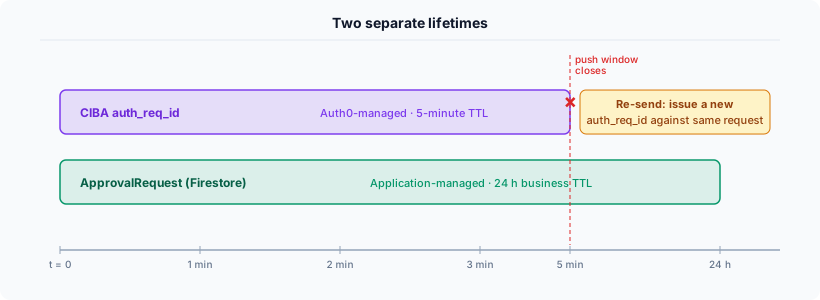
The auth_req_id is ephemeral. Auth0 manages it, it expires in five minutes, and there is nothing you can do to extend it. If the approver does not respond in time, the ticket is gone.
The approval request is durable. Your application manages it. You decide when it expires - in this implementation, 24 hours after creation. The Firestore record is independent of any CIBA flow. It exists whether or not a push was ever sent, and it persists after the push expires.
The practical consequence: when expired_token comes back from the poll, the right response is not to mark the approval request as failed. The right response is to note that this particular delivery attempt expired, leave the request as pending, and either wait for the approver to find it in the in-app inbox or offer a re-send.
The hybrid architecture
This gives us two approval paths from the same request.
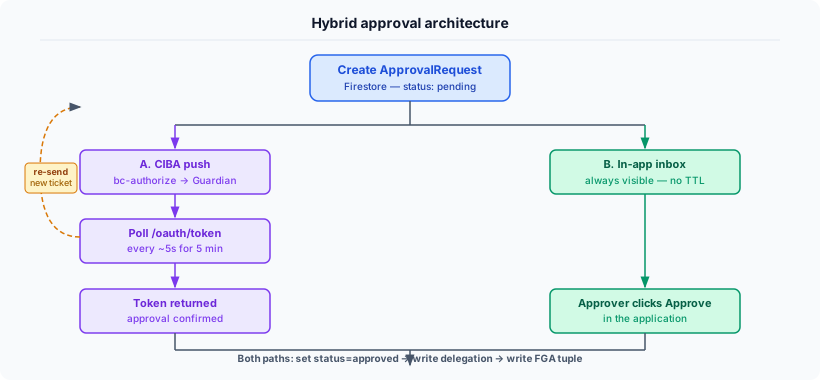
Path A: CIBA push. When the request is created, bc-authorize fires and the approver receives a Guardian push. The application polls. If the approver responds within five minutes, the poll returns a token and the approval completes immediately. If the window expires, Path A ends - but the request is still open.
Path B: In-app inbox. The request appears in the approver's inbox the moment it is created, regardless of CIBA. The approver can act on it any time before the business TTL expires.
Both paths write the same result to Firestore: status: approved, then a delegation record, then the FGA tuple. The requester's experience is identical regardless of which path fired.
Re-send. After CIBA expires, it is straightforward to offer a re-send button. This calls bc-authorize again with the same binding message, stores the new auth_req_id against the existing request, and starts a fresh five-minute poll window. The request object is unchanged - only the delivery ticket is new. Rate-limiting re-sends (tracking cibaAttempts on the request) prevents abuse.
The in-app inbox is not a fallback of last resort. It is a first-class path. Some approvers prefer it. Some are not enrolled in Guardian. Some will see the push expire while in a meeting and then approve via the app when they are free. The system handles all of these without the requester needing to know which path fired.
Consent as a compliance record
What makes this pattern genuinely useful for regulated industries is not the approval mechanics but the audit record it produces.
Three events are written for every successful approval, all linked by the same correlation ID.
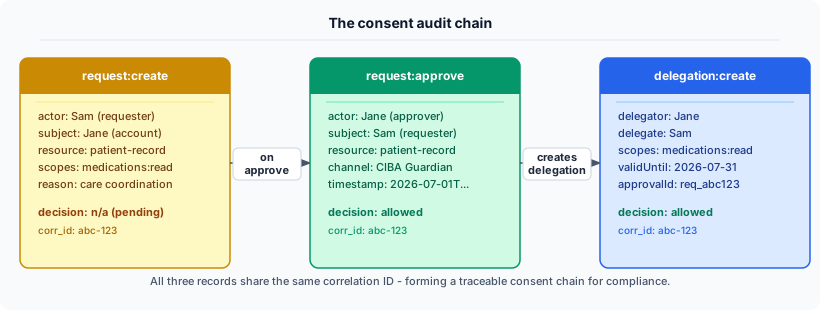
The request:create event records who asked, for what, and why. The request:approve event records who approved, when, and by which channel - CIBA Guardian push or in-app inbox. The delegation:create event records what was granted, with what scopes, until when, and which approval authorised it.
Together these answer the question a compliance team or regulator will eventually ask: can you prove that this person consented to this access, at this time, for this purpose? The audit chain says yes - and the evidence is in three immutable records with a shared correlation ID that links them unambiguously.
A note on CIBA consent persistence
Auth0's CIBA does not persist consent grants. Each CIBA flow is a standalone authentication event. If the same requester asks for access again tomorrow, another Guardian push goes out and another approval is required.
This surprises people who expect that once Jane has approved Sam's access, future CIBA flows against the same pair will be skipped. They will not be.
In practice this is not a problem for the use case in this series, because the result of the approval - the delegation record - persists independently. Sam's subsequent access to Jane's medication list goes through the FGA check against the active delegation, not through a new CIBA flow. CIBA provides the approval event; FGA and the application data store enforce the ongoing authorisation.
Where CIBA non-persistence does matter is if you want to use CIBA as a recurring step-up mechanism rather than a one-time approval trigger. In that case, each challenge requires a fresh Guardian response - there is no stored consent that would allow subsequent challenges to be skipped. That is a deliberate design choice in Auth0's implementation, and worth knowing before committing to a CIBA-based architecture for repeated sensitive actions.
What this series has covered
Across these four posts I have walked through building delegated access using Auth0 and Auth0 FGA: why the actor/subject distinction matters and where RBAC falls short; how Auth0, Auth0 FGA and an application data store fit together with clear ownership boundaries; the approval flow and how CIBA delivers the real-time push; and finally the resilience patterns that make the approval flow work reliably when the real-time path fails.
The working demonstration is at delegated-accounts-auth0.vercel.app and covers all of these flows across six industry verticals. The /demo page has a step-by-step presenter script for each vertical if you want to run through it.