Integrating Intercom with Auth0 On-Behalf-Of Token Exchange for a Full Login Audit Trail
Most integrations between an application and a third-party support tool like Intercom share one weakness: the connection between "who logged in" and "who's chatting" is loosely typed at best. A backend service holds an API key, mints an identity token for whoever the session says is logged in, and hopes the two stay in sync. If you ever need to answer "who actually authorised this support conversation, and through what chain of services," the honest answer is usually "we're not sure, check the logs and hope."
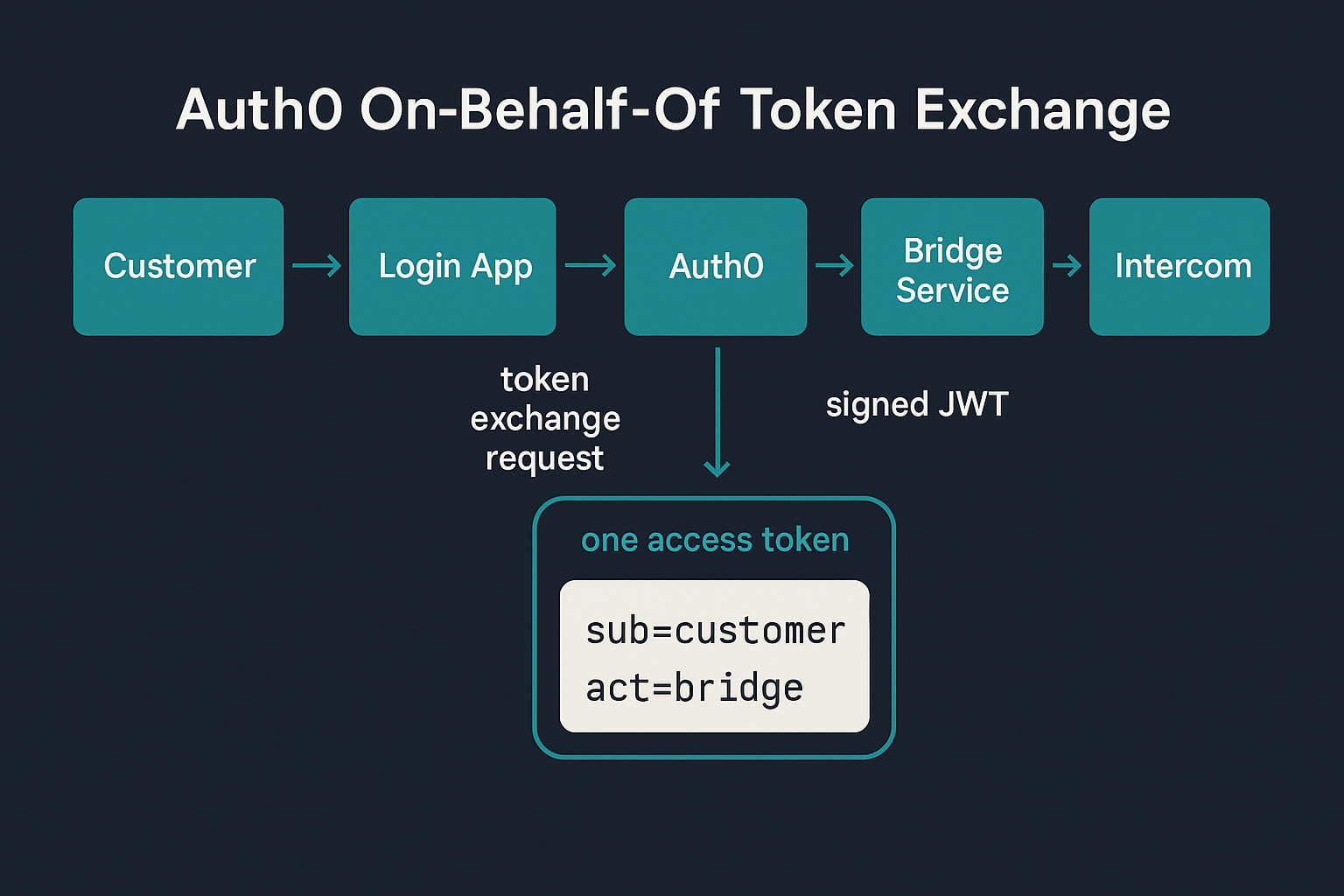
Auth0's On-Behalf-Of (OBO) token exchange - an implementation of RFC 8693 - gives you a cleaner answer. Rather than a backend service quietly assuming an identity on the user's behalf, it performs a real, Auth0-mediated exchange: the customer's own access token goes in, and a new token comes back carrying both the original sub (who the customer is) and a nested act claim recording exactly which service performed the exchange on their behalf. I have written about the actor-versus-subject distinction this enables previously and about a gnarly OBO debugging session more recently - this post is the missing piece in between: a concrete walkthrough of wiring OBO into a real third-party integration, using Intercom's Messenger Security as the destination.
In this post I will detail how a customer login flows through a real Auth0 On-Behalf-Of exchange into a verified Intercom chat session, how that gives you a full audit trail from the moment someone logs in to the moment they're chatting with support, and how to put a human back in the loop for the sensitive requests that come up mid-conversation, by triggering a real CIBA push approval from inside the chat itself.
The steps we will cover in this post are as follows.
- Why the naive "share a secret, mint a token" integration falls short
- Setting up the Auth0 side - a Custom API client for the exchange
- Deferring the exchange until the customer actually opens chat
- Reading the delegation chain back out of the exchanged token
- Minting the Intercom identity credential from a token you can trust
- Triggering a real CIBA approval from inside the conversation
Why the naive integration falls short
The common pattern for wiring a support widget into an authenticated application looks like this: the backend holds Intercom's Messenger secret key, and whenever a page loads for a logged-in user, it signs a JWT with that user's ID and email and hands it to the widget. This works, and it's what Intercom's own documentation describes.
What it doesn't give you is any record of how the backend decided this was the right user, or which service in your stack actually made that call. If your architecture has more than one hop between the customer's login and the service that talks to Intercom - a staff portal calling a bridge service, an API gateway fronting several backends, a bot that needs to act with the customer's authority but isn't the customer - the identity just gets carried forward as a plain value. Nothing in the token itself proves the chain of custody.
Auth0's OBO exchange fixes this by making the delegation chain part of the token, not part of your application's internal trust. Every hop that performs an exchange shows up in act, nested if there's more than one, and the original sub never changes underneath it.
Setting up the Auth0 side
The exchange needs a Custom API client - a distinct Auth0 client from your regular login application, configured specifically to accept token exchanges.
curl --request POST \
  --url "https://YOUR_DOMAIN/api/v2/clients" \
  --header "authorization: Bearer YOUR_MGMT_API_TOKEN" \
  --header "content-type: application/json" \
  --data '{
    "name": "Support Bridge Service",
    "app_type": "resource_server",
    "token_endpoint_auth_method": "client_secret_post",
    "resource_server_identifier": "https://api.yourapp.com/support-bridge"
  }'
app_type: "resource_server" looks unusual for a client, but it's correct - this is what marks it as a Custom API client eligible to perform OBO exchanges, and resource_server_identifier needs to match a resource server you've already created with the same identifier. Enable Skip User Consent on that resource server too, since this client is first-party and you don't want a consent screen appearing in the middle of a support flow.
Then turn on the exchange for the client itself:
curl --request PATCH \
  --url "https://YOUR_DOMAIN/api/v2/clients/YOUR_BRIDGE_CLIENT_ID" \
  --header "authorization: Bearer YOUR_MGMT_API_TOKEN" \
  --header "content-type: application/json" \
  --data '{
    "token_exchange": { "allow_any_profile_of_type": ["on_behalf_of_token_exchange"] }
  }'
(Note: Replace YOUR_DOMAIN, YOUR_MGMT_API_TOKEN and YOUR_BRIDGE_CLIENT_ID with your tenant's specific values).
Finally, a user-delegated client grant links the bridge client to its own audience:
curl --request POST \
  --url "https://YOUR_DOMAIN/api/v2/client-grants" \
  --header "authorization: Bearer YOUR_MGMT_API_TOKEN" \
  --header "content-type: application/json" \
  --data '{
    "client_id": "YOUR_BRIDGE_CLIENT_ID",
    "audience": "https://api.yourapp.com/support-bridge",
    "scope": [],
    "subject_type": "user"
  }'
One easy mistake here: the customer's original login also needs to request this same audience. If your login flow's /authorize call doesn't include an audience parameter at all, Auth0 issues an opaque, /userinfo-only access token, which the exchange endpoint will reject outright with an audience mismatch error. The audience the customer logs in against has to be the bridge service's own resource_server_identifier - not your Management API audience, and not the eventual downstream target.
Deferring the exchange until the customer actually opens chat
The exchange itself doesn't need to happen at login. In fact, for a support widget, it's better if it doesn't - the widget can boot anonymously the moment the page loads, and the OBO exchange only fires the instant the customer actually opens the chat panel, upgrading that same anonymous session to a verified one in place.
app.post('/api/support-bridge/start-chat', async (req, res) => {
  const session = getCustomerSession(req);
  if (!session) return res.status(401).json({ error: 'Not logged in' });

  const exchangeRes = await fetch(`https://${AUTH0_DOMAIN}/oauth/token`, {
    method: 'POST',
    headers: { 'Content-Type': 'application/json' },
    body: JSON.stringify({
      client_id: BRIDGE_CLIENT_ID,
      client_secret: BRIDGE_CLIENT_SECRET,
      subject_token: session.customerAccessToken,
      grant_type: 'urn:ietf:params:oauth:grant-type:token-exchange',
      subject_token_type: 'urn:ietf:params:oauth:token-type:access_token',
      requested_token_type: 'urn:ietf:params:oauth:token-type:access_token',
      audience: BRIDGE_AUDIENCE
    })
  });

  const { access_token } = await exchangeRes.json();
  // access_token now carries sub (the customer, unchanged) and act
  // (this bridge service as the delegate that performed the exchange)
});
The practical effect: a real audit trail exists showing exactly when the customer authenticated, and separately, exactly when and by which service their identity was exchanged to talk to a third party. Those are two different moments, and now they're two different, individually inspectable events rather than one blurred assumption.
Reading the delegation chain back out of the exchanged token
The token that comes back from the exchange is a normal Auth0 access token, and decoding it shows the delegation chain directly:
{
  "sub": "auth0|6aa76cc791457c2c09b7670b",
  "act": {
    "sub": "YOUR_BRIDGE_CLIENT_ID",
    "act": {
      "sub": "YOUR_LOGIN_APP_CLIENT_ID"
    }
  }
}
sub is the customer, unchanged throughout. act records the bridge service as the actor that performed this exchange, and nests further if more than one service was involved in the chain. None of this requires an Auth0 Action or any custom claims logic - Auth0 populates it automatically as part of the exchange itself. For an integration where a support agent, an auditor, or a regulator might reasonably ask "who accessed this customer's identity, and on whose authority," that's the difference between a log line you have to trust and a signed, verifiable answer.
Minting the Intercom identity credential from a token you can trust
Only after the exchange succeeds does the backend mint the actual Intercom credential, using the sub from the exchanged token rather than anything the client claimed about itself:
const intercomJwt = jwt.sign(
  { user_id: exchangedClaims.sub, email: customer.email, name: customer.name },
  INTERCOM_MESSENGER_SECRET,
  { algorithm: 'HS256', expiresIn: '1h' }
);
That JWT is what boots Intercom's Messenger widget into a verified session, upgrading it from anonymous in place via Intercom('update', ...). The customer sees no interruption - the chat bubble was already there - but from that moment the conversation is tied to a real, Auth0-verified identity, minted from a token whose provenance you can trace end to end.
One gotcha if you go looking for the signing secret yourself: Intercom has two visually similar-looking credential pairs that are easy to conflate. The Messenger identity verification secret lives under Settings → Messenger → Security and is what signs this JWT. A separate Client ID and Client secret live under Developer Hub → your app → Basic information, used for a completely different purpose - signing webhook payloads if you're also receiving events back from Intercom. Both are UUID-formatted and neither dashboard page tells you which is which if you land on the wrong one first.
Triggering a real CIBA approval from inside the conversation
A verified chat session tells you who you're talking to, not whether a specific request should go through unsupervised. A customer asking for their account balance and a customer asking to change their plan or increase a limit are not the same risk, and treating them the same just because both arrived through the same authenticated widget throws away the one advantage a human-in-the-loop check gives you.
Client-Initiated Backchannel Authentication (CIBA) is Auth0's mechanism for exactly this: a backend service starts an out-of-band approval request against a user's registered device, without that user needing an open browser session anywhere. It's normally used to step up a call-centre agent's request or approve a high-value transaction, but nothing about it requires the trigger to be a phone call or a web form - it just needs a sub and a reason. That makes it a natural fit for a chat message.
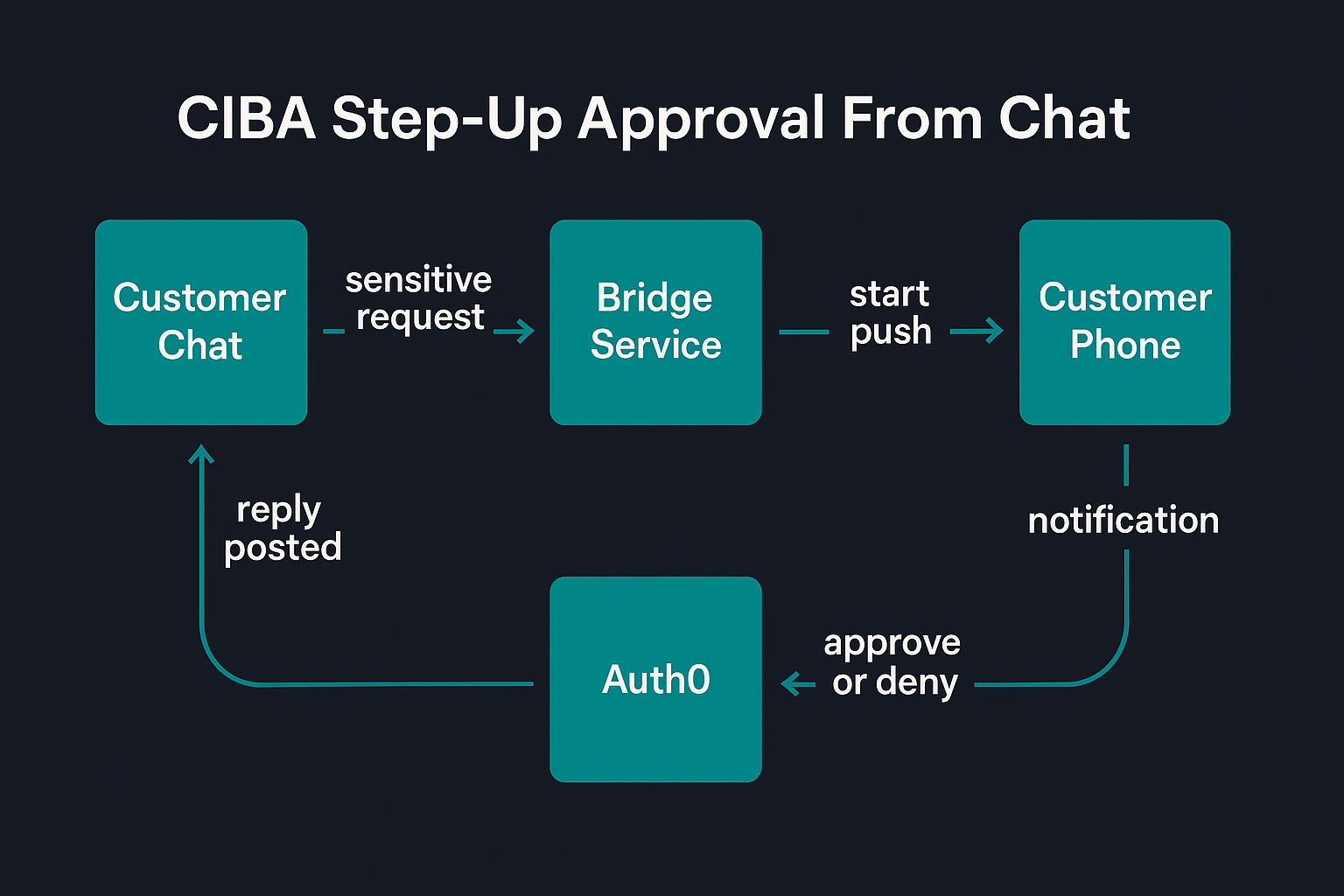
The integration is registered on an Intercom webhook, subscribed to conversation.user.created and conversation.user.replied, so our backend gets notified every time the customer sends a message. A simple keyword check decides whether the message is sensitive enough to warrant step-up before answering:
const STEP_UP_KEYWORDS = ['change my plan', 'upgrade', 'increase my limit', 'reset my password'];

if (STEP_UP_KEYWORDS.some(k => messageText.includes(k))) {
  await replyInConversation(conversationId, "To make that change, I need to verify it's really you. Sending a push notification to your phone now.");
  startCibaApproval(conversationId, customer, messageText);
  return;
}
startCibaApproval calls the same /bc-authorize endpoint and polling loop you'd use for any other CIBA flow - there is nothing Intercom-specific about it, which is the point. The sub for the push comes straight from the exchanged token's own sub, so the approval request lands on the device belonging to the same customer the delegation chain says is in the conversation, not a value the bridge service invented:
async function startCibaApproval(conversationId, customer, requestText) {
  const { auth_req_id } = await startCibaPush(customer.sub, `Approve: ${requestText}`.slice(0, 64));

  const deadline = Date.now() + 90_000;
  while (Date.now() < deadline) {
    await sleep(4000);
    const result = await pollCibaStatus(auth_req_id);
    if (result.status === 'approved') {
      return replyInConversation(conversationId, "Verified - your request has been submitted.");
    }
    if (result.status === 'denied') {
      return replyInConversation(conversationId, "That request was denied on your phone.");
    }
  }
  return replyInConversation(conversationId, "The verification request timed out.");
}
The one real infrastructure wrinkle: CIBA approval can take up to a minute, which is far too long to hold a webhook response open, but also too long to fire-and-forget without a second thought. Most serverless platforms will freeze or tear down a function the moment its HTTP response is sent, regardless of whether a promise is still in flight - I found this out directly, watching a webhook get accepted with no error and then simply never post the reply it was supposed to. On Vercel the fix is waitUntil() from @vercel/functions, which extends the function's lifetime for as long as the wrapped promise takes to settle:
import { waitUntil } from '@vercel/functions';

app.post('/api/support-bridge/webhook', async (req, res) => {
  // ...identify the conversation, check for step-up keywords...
  waitUntil(startCibaApproval(conversationId, customer, messageText));
  res.status(200).json({ received: true });
});
The result is a chat conversation where a sensitive request gets a real push notification, approved or denied by the customer on their own device, and the outcome lands back in the same conversation thread a few seconds later - with the whole thing showing up in Auth0's own logs as a CIBA authorisation tied to the same sub the delegation chain already established. No browser tab needs to stay open for it; the trigger, the approval, and the audit record all happen entirely from chat.
Conclusion
The pattern here generalises well beyond Intercom - any third-party platform that accepts an externally-signed identity token is a candidate for sitting behind an OBO exchange rather than a shared secret and a loosely-typed user ID. What you get in return is a delegation chain that's part of the token itself rather than something you have to reconstruct from application logs after the fact. If you're building out a support or assisted-channel integration and want the full audit trail from login to conversation, Auth0's OBO documentation is the right starting point, and Auth0 FGA is worth a look if the next question is who's allowed to act on whose behalf, not just who did.