Multi-Tenant Home Realm Discovery with Auth0 Advanced Custom Universal Login
Home Realm Discovery (HRD) is a well-understood pattern typically used to route a user to their enterprise connection within a tenant, but moving that routing logic inside Auth0's Advanced Custom Universal Login (ACUL) opens up some interesting possibilities. Recently I set out to build a demonstration of multi-tenant routing — the same email-lookup pattern that directs a user to the right regional or business-unit Auth0 tenant — with the lookup and connection routing handled entirely within the ACUL login-id screen, eliminating the need for a separate landing page or edge proxy.
In this post I will detail the Auth0 configuration, the ACUL screen implementation, and the challenges I encountered along the way. For ease of demonstration the two routing targets live as separate connections within a single Auth0 tenant; in production the same architecture maps cleanly onto separate tenants per region or business unit, which are the two real-world scenarios that most commonly drive this kind of requirement.
The steps we will cover in this post are as follows.
- The problem: two scenarios where HRD matters
- The architecture and how the routing decision works
- Auth0 setup — connections, custom domains, and identifier-first
- Configuring ACUL via the CLI
- The
login-idscreen — lookup, theming, and cross-domain redirect - The
login-passwordscreen — and a surprise about where the email lives - Challenges encountered
The Problem
Before getting into implementation, it's worth framing the two scenarios that most commonly require this kind of routing logic.
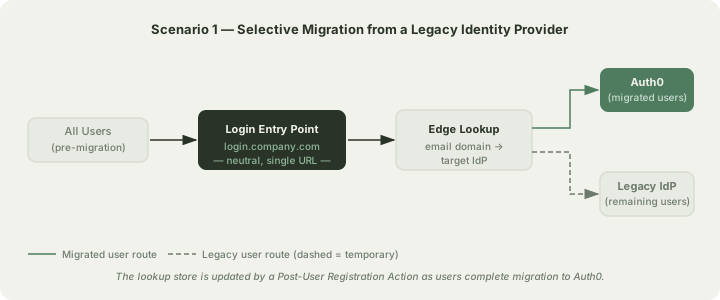
Selective migration from an existing identity provider. When migrating users from a legacy IdP or a custom identity system to Auth0, it is rarely practical to cut all users over at once. A common approach is to migrate cohorts of users progressively — by business unit, geography, or account tier — while keeping the remainder on the existing system. This means a single login URL needs to route the user to either Auth0 or the legacy IdP based on who they are. An edge KV lookup mapping email domain (or individual email hash) to the target IdP gives you that routing without requiring users to know or care which system holds their credentials.
Global Auth0 deployments with data residency requirements. Organisations operating across multiple jurisdictions often need user data to remain within a specific region. Auth0 supports this through regional tenants — for example, a US tenant and an EU tenant — but that means a user in France and a user in California cannot both authenticate against the same tenant. A neutral login entry point that looks up the user's region and redirects them to the geographically appropriate Auth0 tenant satisfies the data residency requirement without exposing the regional architecture to the end user.
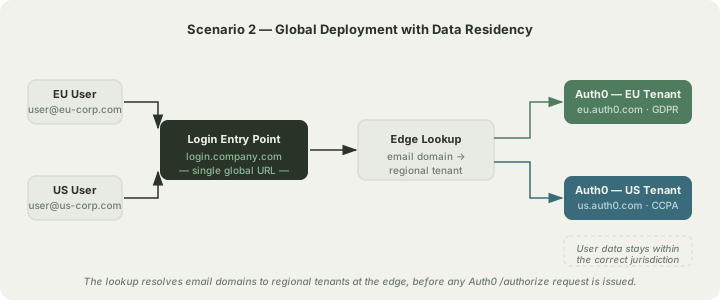
In both cases the pattern is the same: a user arrives at a single login surface, enters their email, and is routed transparently to the correct identity system before they ever see a credential screen. The rest of this post describes one way to implement this entirely within Auth0 ACUL, with the lookup handled by a fast edge API.
The Architecture
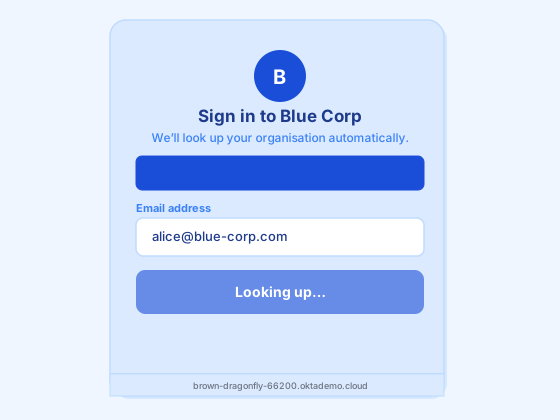
The core idea is straightforward: instead of routing users at the network edge before they reach Auth0, we let Auth0's Universal Login initiate the flow and use the login-id ACUL screen to perform the lookup and routing. For most users, the call to a lookup service confirms they belong to the tenant they arrived at, and authentication proceeds normally. For the case where a user arrives at the wrong tenant or region — the ACUL screen detects the mismatch, shows a brief "redirecting you" badge, and sends them back through the application to restart the flow on the correct domain.
The high-level flow for a matched user looks like this.
- User arrives at their tenant's landing page and clicks Sign In.
- The application sets a tenant cookie and redirects to
/auth/login, initiating the OAuth flow. - Auth0 opens the ACUL
login-idscreen on the tenant's custom domain (e.g.blue.yourcompany.com). - The user enters their email. The ACUL screen calls a lookup API with the email domain.
- The lookup confirms the tenant. A routing badge appears briefly, then
loginId.login()submits the identifier to Auth0. - Auth0 advances to the
login-passwordscreen, also ACUL-rendered with the same tenant theme. - On successful authentication the session is established and the user lands on the application dashboard.
For a mismatched user — step 4 returns a different tenant or region — the ACUL screen redirects the user back to the application's /api/tenant endpoint with the correct tenant and the email as a login_hint, restarting the flow on the right domain entirely. The full decision logic inside the ACUL login-id screen is shown below.
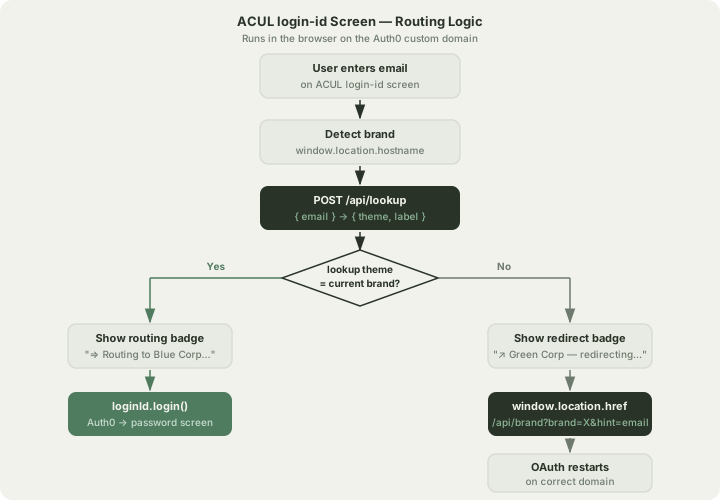
It is worth noting where this approach sits relative to a full edge-proxy HRD implementation. In a production global deployment the lookup would typically happen at the edge — before the Auth0 /authorize request is even issued — which means cold-start latency is never a factor and users never reach the wrong regional tenant in the first place. The ACUL-based approach described here handles the in-flight mismatch case as a fallback and is well-suited to scenarios where the edge proxy is not yet in place, or where the routing surface is a single tenant with multiple connections rather than multiple separate tenants.
Security Considerations
Introducing a lookup step before authentication creates a few security concerns worth addressing before you deploy this in earnest.
User enumeration. The most significant risk with any HRD implementation is that the lookup endpoint reveals which email addresses or domains are registered in your system. If the API returns a distinct error or behaves differently for unknown domains, an attacker can feed it large lists of addresses and silently map out your user base. The mitigation is to never return a "not found" response — always redirect to a designated default tenant. For an unknown domain, route the user to the primary Auth0 tenant as if they belong there. Auth0 will then handle the authentication failure with its standard "Wrong email or password" response, and the attacker cannot distinguish between a failed lookup and a failed login.
Additionally, if you ever surface a multi-tenant selection screen — for example, when a user exists in more than one region — displaying that list immediately confirms the user's existence. Introducing a secondary verification step before revealing the list, such as sending a one-time code to the email address, removes that signal.
Rate limiting and bot protection. The lookup endpoint is unauthenticated and publicly reachable, which makes it an attractive target for automated enumeration even with the default-routing mitigation above. At a minimum, apply rate limits per IP address on the endpoint. For higher-sensitivity deployments, embedding a CAPTCHA token in the ACUL screen and validating it in the lookup service before performing the KV read provides a meaningful additional barrier. Cloudflare Turnstile integrates cleanly with a Cloudflare Worker-hosted lookup without introducing visible friction for real users.
login_hint exposure. When the ACUL screen detects a cross-domain mismatch and redirects, the user's email address is included as a login_hint query parameter in the redirect URL. This means the email is visible in server access logs and browser history on the destination domain. For most enterprise deployments this is acceptable — the email is not a secret — but if your policy requires that email addresses not appear in URLs, you can instead pass the hint via a short-lived server-side token that the destination domain redeems once.
Tenant cookie tamper. The demo uses a demo-tenant cookie to track which Auth0 client should handle a given session. An attacker who modifies this cookie would at most cause their own OAuth flow to be initiated against the wrong client — which Auth0 would reject at the id_token_hint stage during logout, or simply result in a failed login because their credentials do not exist in the targeted connection. The cookie is not a security boundary; the connection-level client restriction in Auth0 is. That said, setting the cookie as HttpOnly and SameSite=Lax — as this implementation does — limits the attack surface to direct header manipulation rather than XSS.
Auth0 Setup
The demo uses a single Auth0 tenant with:
- Two database connections:
blue-connectionandgreen-connection, each withenabled_clientsset to only the corresponding application at creation time. - Two custom domains, one per tenant, provisioned separately.
- Identifier First authentication profile enabled under Authentication → Authentication Profile.
One thing to be aware of with connections: the Management API v2 PATCH /api/v2/connections/{id} endpoint rejects enabled_clients as an additional property when patching. The only reliable way to constrain a connection to specific clients is to include enabled_clients in the initial POST body when creating the connection. If you need to add a client to an existing connection you will need to delete and recreate it, or manage this through the dashboard.
Configuring ACUL
ACUL is configured per-screen using the Auth0 CLI. As of mid-2026 the auth0 ul customize --rendering-mode advanced command path is deprecated; the correct commands are under auth0 acul.
To generate a config stub for the login-id screen:
auth0 acul config generate login-id --tenant your-tenant.auth0app.comThis produces a JSON file at acul_config/login-id.json. Editing it to set rendering_mode to advanced, disable the default head tags, and point at your bundle:
{
  "context_configuration": [
    "branding.settings",
    "branding.themes.default",
    "client.logo_uri",
    "untrusted_data.submitted_form_data",
    "untrusted_data.authorization_params.login_hint"
  ],
  "default_head_tags_disabled": true,
  "filters": {},
  "head_tags": [
    {
      "tag": "script",
      "attributes": {
        "src": "https://your-app.vercel.app/acul/login-id.iife.js",
        "defer": true
      }
    }
  ],
  "rendering_mode": "advanced",
  "use_page_template": false
}
Apply it with:
auth0 acul config set login-id --file acul_config/login-id.json --tenant your-tenant.auth0app.com --no-inputThe context_configuration array controls which data from the Auth0 Universal Login context is injected into the page for your script to read. You do not need to list user here — it is part of the base context and is available automatically after the identifier is matched, which matters for the password screen (more on that below).
The login-id Screen
The login-id bundle is built with Vite as an IIFE and served as a static file. At runtime it reads window.location.hostname to determine the active tenant theme, renders the form, and on submit calls a lookup API before advancing the flow.
The relevant submit handler:
form.addEventListener('submit', async (e) => {
  e.preventDefault();
  const email = emailInput.value.trim();
  if (!email) return;

  setLoading(true);

  try {
    const res = await fetch(LOOKUP_URL, {
      method: 'POST',
      headers: { 'Content-Type': 'application/json' },
      body: JSON.stringify({ email }),
    });
    const data = await res.json() as { connection: string; theme: string; label: string };

    const matchTheme = data.theme in THEMES ? data.theme : currentTheme;

    if (matchTheme !== currentTheme) {
      // Mismatch — redirect to the correct tenant entry point with the email as a hint
      showBadge(`↗ ${data.label} — redirecting you there…`, THEMES[matchTheme].primary);
      await new Promise((r) => setTimeout(r, 1000));
      window.location.href = `${APP_BASE_URL}/api/tenant?tenant=${matchTheme}&hint=${encodeURIComponent(email)}`;
      return;
    }

    showBadge(`⇒ Routing to ${data.label}…`, THEMES[matchTheme].primary);
    await new Promise((r) => setTimeout(r, 900));
    await loginId.login({ username: email });

  } catch {
    await loginId.login({ username: email });
  }
});
The APP_BASE_URL and LOOKUP_URL constants are injected at Vite build time via process.env.VITE_APP_BASE_URL and process.env.VITE_LOOKUP_URL. The lookup API itself is a simple email-domain-to-tenant mapping — initially a hardcoded Next.js route handler, and later intended to be a Cloudflare Worker backed by Workers KV for edge-local latency.
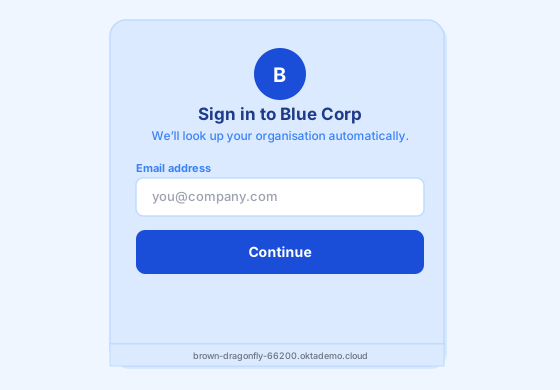
The routing badge appears briefly as shown below before the flow advances.
The login-password Screen
The password screen follows the same pattern: detect the tenant from hostname, apply theme, render the form, and call loginPassword.login({ password }). The only notable difference is how to display the email the user entered on the previous screen.
My first instinct was untrustedData.submittedFormData.username — the identifier submitted on the login-id screen. In practice this is not carried forward in the ACUL context after identifier-first; submittedFormData on the password screen refers to the current screen's submitted data, not the previous one.
The correct source is loginPassword.user?.email, which is populated automatically in the base context once Auth0 has matched the identifier to a user account. You do not need to add user.email to context_configuration — attempting to do so returns a 400 validation error. Simply read it directly:
const loginPassword = new LoginPassword();

const email =
  loginPassword.user?.email ??
  (loginPassword.untrustedData?.submittedFormData as Record<string, string> | null)
    ?.username ??
  loginPassword.untrustedData?.authorizationParams?.login_hint ??
  '';
The fallback chain covers the cross-domain redirect case, where the email is available as login_hint in the authorisation parameters rather than as a matched user record.

Challenges Encountered
ACUL endpoints returning 404. The Management API v2 endpoint /api/v2/branding/screens/{screen}/renderer, which is what most documentation examples reference, returned 404 on a freshly provisioned Auth0 tenant until ACUL was explicitly enabled on the tenant. Once enabled, the correct path to apply configuration is via the CLI (auth0 acul config set) rather than direct API calls. The old auth0 ul customize --rendering-mode advanced workflow is deprecated as of June 2026 and should not be used for new implementations.
Logout failing with invalid_request: Invalid id_token_hint. The two tenants use separate Auth0 clients and the logout flow includes the ID token as a hint to Auth0. My /api/logout route was clearing the tenant cookie in the redirect response, which meant the follow-up /auth/logout request arrived with no cookie — the server defaulted to the blue tenant client, but the active session had been created by the green tenant client. Auth0 correctly rejected the mismatch. The fix was to not clear the tenant cookie on logout at all; the cookie is harmless without an active session and gets overwritten on the next tenant selection.
Email blank on the password screen. As described above, untrustedData.submittedFormData does not carry the identifier forward across screens in an identifier-first flow. The fix was user.email from the base context, which Auth0 populates automatically after the identifier step.
Next.js proxy intercepting custom route handlers. Next.js 16 uses a proxy.ts file (formerly middleware.ts) that runs before all route handlers. A custom /api/tenant route handler was returning 404 because the proxy was intercepting the request before Next.js had a chance to route it to the handler. The resolution was to handle the /api/tenant logic directly inside proxy.ts rather than as a separate route handler — checking pathname === '/api/tenant' at the top of the proxy function and returning a redirect response with the appropriate cookie.
Next Steps
The lookup API in this demo is a hardcoded domain-to-tenant mapping suitable for demonstration. The production architecture replaces this with a Cloudflare Worker backed by Workers KV — a globally-distributed key-value store that resolves email domains to their target Auth0 tenant at the edge with sub-30ms latency. An Auth0 Post-User Registration Action writes new user mappings into KV at signup, closing the loop.
Additionally, the Security Considerations section above noted the need to protect the lookup endpoint from automated enumeration. The production Worker will include Cloudflare Turnstile validation — a token generated by the ACUL screen and verified by the Worker before any KV read is performed. Turnstile integrates natively with Cloudflare Workers at no additional cost and presents no visible friction for real users. I've covered both the Worker upgrade and the Turnstile integration in part two.
The full source for this demo is available upon request.